
Retrospective Tools
RetroFlow logo
Retrospectives

RetroFlow

Your team's favourite way to retro

Overall score
3.4

Overview

RetroFlow is a free, no-signup retrospective board built by solo developer Prashant Meena, with colourful boards, real-time collaboration, 11 ready-made templates plus a custom board builder, anonymous feedback, unrestricted upvoting, drag-to-move between columns, action items and PDF/Excel export. Participants join a shared link in one click with no account; the whole product is free with no paid tiers or locked features. The board is desktop-only — any viewport under 768px is blocked outright.

Best for: Small or ad-hoc teams on laptops who want a genuinely free, zero-friction retro board they can share with one link — no signup, no payment and no setup, accepting that there is no timer, no phone support, no integrations, no AI and no enterprise controls.
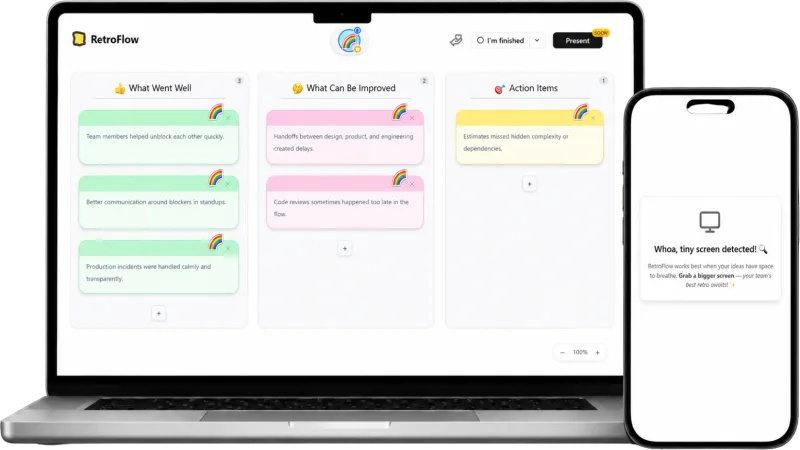
RetroFlow retrospective board shown on desktop and mobile

How RetroFlow describes itself

RetroFlow sells friction removal, not capability. The homepage promise is "your team's favourite way to retro" — "colorful boards, real-time collaboration, and zero signup walls," where participants "join with one click, no account needed."

"100% Free, Forever. No pricing tiers. No premium features locked behind a paywall."

The self-reported social proof is unchanged and still unverifiable: "10,000+ retros run, 400+ teams, 4.9/5 avg rating, 50+ countries". The voice is indie and personal — the support page is a LinkedIn DM invitation signed by Prashant, and a board outage routes you to his WhatsApp number. Marketing trails the product badly. The homepage still advertises seven templates against the app's eleven, never mentions export, and the FAQ promises a phone experience the app refuses to load.

Our take

RetroFlow is the best free retro board that asks nothing of you: pick one of eleven formats, share a link, and the team drops notes, upvotes and captures actions live — no account, no cap. Voting has loosened since the last pass — no budget, no phase gate, own cards included — cards drag between columns, and PDF/Excel export still works.

Against the agile lens it stays thin. There is still no timer: none in the shipped bundle, and two July requests sit "Planned" on the vendor's roadmap. No grouping, no action carry-over, no integrations, no AI, no health checks, and "Present" is still badged SOON. It is also desktop-only — under 768px every board shows "Whoa, tiny screen detected", flatly contradicting the FAQ's "fully responsive" claim.

Note two things before trusting anything written about it. There is still no independent coverage — nothing on G2, Capterra or Product Hunt — so the usage numbers are self-reported. And the vendor's comparison blog still ticks "Timer" and "20+ templates". Trust the product, not the blog.

Best for ad-hoc, laptop-based retros where zero cost and zero setup beat everything else; not a fit for timeboxed facilitation, phone participants, integrations or governance.

Score breakdown

Ease of Use8.0
Retro Toolkit4.0
Value9.0
Fun Factor4.5
AI & Insights0.0
Integrations0.0
Open Platform1.0
Enterprise-grade1.0

Pros

  • + Genuinely free with no paid tiers, no paywalled features and no account required to join a board
  • + Anonymous feedback — participants contribute with no signup, email or PII collected
  • + Three-step setup — pick a template, share the link, run the retro; participants join in one click and notes sync live
  • + Eleven ready-made formats plus a Custom Board builder (2-6 columns, 7 palettes, 48 emoji) with reusable saved layouts
  • + Unrestricted voting — no vote budget, no phase gate, and you can upvote your own cards; cards also drag between columns
  • + PDF and Excel export of the finished board — the only route to getting your data out, and it works

Cons

  • − No timer or phase controls — still nothing in the shipped app, and two timer requests raised in July 2026 sit unshipped as Planned on the vendor's own public roadmap
  • − Desktop-only — every board route hard-blocks viewports under 768px with a 'Whoa, tiny screen detected' overlay, even though the marketing FAQ promises a fully responsive phone experience
  • − No grouping of similar cards, no in-column reordering and no carry-over of previous action items; the 'Present' button is still badged SOON
  • − No integrations at all — nothing pushes to Jira, Linear, Slack or Teams, and there is no public API, webhooks or AI
  • − No health checks, recurring retros, mood tracking or cross-team reporting
  • − Solo-developer project with no support team, SLA, SOC 2, SSO or GDPR statement — support routes to a personal WhatsApp number and LinkedIn DMs, and the free-tier backend still shows a ~10s cold start plus a first-load error

Features

Retrospectives

Templates· 11 built-in formats: Classic, Start Stop Continue, Mad Sad Glad, 4Ls, Sailboat, Drop Add Keep Improve, Rose Thorn Bud, Plus / Delta, Keep Problem Try, Three Little Pigs, Worked Want ImproveCustom templates· Custom Board — custom column names, 2-6 columns, 7 colour palettes and 48 emoji; layouts can be saved, renamed, duplicated and deleted via Your Templates, scoped to the browser's localStorage since there are no accountsAnonymous input· Anonymous feedback — no signup, email or PII required to contribute

Facilitation

Action items· Action Items column of notes — no owner assignment or due dates

Voting

Independent dot voting· Per-card Upvote with no vote budget — one vote per person per card, unlimited cardsVote at any time· Upvoting is open from the moment a card exists, including on your own notes; only the personal 'Hide my votes' toggle pauses it

Engagement

Custom backgrounds· 7 colour palettes per board

Reporting

Export formats· PDF, Excel

Enterprise

Guest / observer roles

Integrations

No native integrations listed.

Compare RetroFlow against