
Retrospective Tools
Spreo logo
Retrospectives· UK· Founded 2019

Spreo

Interaktywna tablica do współpracy dla zespołów stosujących metodologię agile

Overall score
5.9

Overview

Spreo (formerly Metro Retro, then Ludi — renamed Spreo on 1 July 2026 after a US trademark cease-and-desist) is a visual agile collaboration whiteboard with 150+ templates spanning retros, planning poker, icebreakers and futurespectives. Its illustrated canvas and board gadgets — a shared Jukebox music player, timers, spinners, buzzers, confetti, throwable hats — make ceremonies feel engaging. Since late October 2026 it is priced by role: $13 a month for each Editor who runs sessions, $3 for regular team members and nothing for visitors on open boards, with Jira, Linear, SSO, PDF export and a beta MCP server all on the one Team plan. In-product AI still stops at beta sticky-note clustering.

Best for: Agile teams who want retros, planning and workshops to feel visual and fun on a Jira or Linear backlog, with a few paid facilitators and everyone else on cheap Collaborator seats or free visitor links — and who would get real value from driving boards with an AI assistant over MCP.
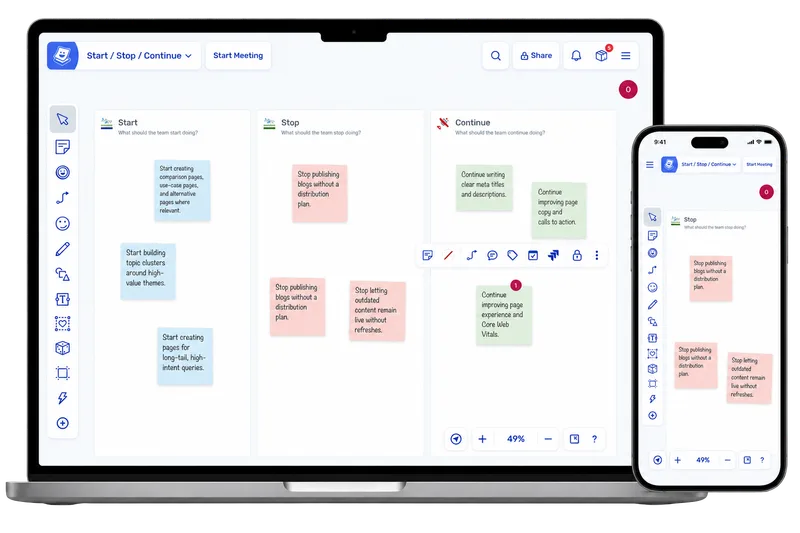
Spreo retrospective board shown on desktop and mobile

How Spreo describes itself

Spreo — Metro Retro until August 2025, then Ludi, and Spreo since 1 July 2026 after a US trademark holder's cease-and-desist — pitches itself as the whiteboard built for agile ceremonies rather than general brainstorming.

"Spreo is the online whiteboard software that's more interesting than whatever your team has open in the other tab."

It names its buyers on the nav bar: scrum masters, agile coaches, delivery managers, product owners and engineering managers. The hook is a 150+ template library covering retros, sprint planning, refinement, planning poker and story mapping, with Jira-backed refinement front and centre. The vendor claims more than 250,000 agile teams and practitioners and over two million meetings since 2019, and keeps the voice deliberately unserious — gadgets, throwable hats, endless confetti.

Our take

Spreo is the liveliest canvas in this set for live, same-timezone ceremonies. Private Writing is on by default in Meeting Mode, Hide Identities makes authorship and votes permanently anonymous, voting rounds are properly configurable, and the Jira integration is genuinely two-way. Actions get owners, due dates and daily and weekly reminder emails without anyone chasing. A shared Jukebox, emoji stamps and a quick host poll keep a room engaged; ROTI, kudos and check-ins exist only as board templates.

October's repricing changes the maths. Only facilitators need a $13 Editor seat; regular team members cost $3 and stakeholders join open boards free, so three teams of eight run $102/mo billed annually with Jira, Linear, SSO and the beta MCP server included. The new Linear cards edit back to Linear but can't create issues yet. What hasn't changed: no async mode, no recurring retros, no health-check product, no SOC 2 of its own, and in-product AI that stops at beta sticky clustering. MCP puts the AI in your own assistant, not the board.

Score breakdown

Ease of Use8.5
Retro Toolkit6.5
Value7.5
Fun Factor8.0
AI & Insights2.0
Integrations4.0
Open Platform6.0
Enterprise-grade4.5

Pros

  • + Genuinely delightful, illustrated UI with a gadget shelf built for live sessions: a shared Jukebox, timers, spinners, buzzers and a Voter panel, plus confetti and throwable hats
  • + Broad template library (150+) covering retros, icebreakers, planning poker, futurespectives, planning and estimation
  • + Hide Identities and Private Writing make writing and voting anonymous, with fully configurable voting rounds
  • + Actions carry owners and due dates, with daily and weekly reminder emails on by default and a cross-board Action Items dashboard
  • + Role-based Team plan keeps big teams cheap ($3 Collaborators, free visitors on open boards) and includes two-way Jira, Linear cards, SSO, PDF export and the beta MCP server

Cons

  • − No async retro mode, no recurring or scheduled retros, and no health-check product; mood and radar work happen on whiteboard templates only
  • − Integrations stop at Jira and Linear — no Slack, Teams, Confluence or GitHub; Azure DevOps is on the pricing page but was still "coming soon" in the October 2026 release notes
  • − In-product AI limited to beta sticky-note clustering — no summaries, action-item extraction, sentiment or coaching; MCP moves the AI into your own assistant rather than the board
  • − Every facilitator needs a $13/month Editor seat, and the free Lite board holds three people and lives in one browser
  • − Desktop and laptop only, and no SOC 2 or ISO 27001 of its own: the certifications on its security page are DigitalOcean's

Features

Retrospectives

TemplatesCustom templatesAnonymous input· Funkcja kontroli dostępu „Hide Identities” zapewnia autorom i głosującym trwałą anonimowość w ramach poszczególnych działańPrivate brainstorm (hide until reveal)· Pisanie prywatne, domyślnie włączone w trybie spotkania: notatki pozostają ukryte, dopóki poszczególni autorzy ich nie ujawnią lub organizator nie ujawni ich przymusowoPrivate/public retros

Health checks

Mood / sentiment check· Wyłącznie szablony do tablic suchościeralnych (Niko Niko, Termometr nastroju)

Facilitation

Meeting timerAction itemsLink actions to ideasPresentation modeScreen-share mode@mentionsComments on cardsDrag-and-drop groupingCarry over open actions· Manual: Import Action Items pulls chosen team actions (filter by status or assignee) onto a later board as stickies that stay synced; nothing carries over automaticallyAutomatic action remindersWhiteboard

Voting

Independent dot votingCustom vote countVote on ideas inside groups

Engagement

ROTI feedback· Wyłącznie szablonTeam agreements· Wyłącznie szablonPolling· Element sterujący „Run Poll” zadaje uczestnikom anonimowe pytanie w trybie spotkania; zawiera również szablon z opcjami „Zgadzam się” lub „Nie zgadzam się”IcebreakersIcebreaker games· Tylko szablon: gry planszowe, takie jak „Easter Egg Dash”, w których od 2 do 10 graczy rywalizuje o odnalezienie jajek ukrytych pod karteczkami samoprzylepnymiCheck-in / check-out· Wyłącznie szablony do tablic suchościeralnychGIFs· Przesyłanie, wklejanie lub umieszczanie linków do plików GIF oraz wyszukiwanie obrazów w serwisie Pixabay — bez korzystania z narzędzia Giphy PickerEmoji reactionsMusic· Gadżet „Jukebox” odtwarza utwór udostępniony wszystkim użytkownikom na forumCustom backgroundsPlanning pokerTeam kudos· Wyłącznie szablon (Drzewo pochwał)

AI

AI grouping / clustering· Wersja beta: Funkcja „Sortuj według tematów” automatycznie grupuje posty przypięte w tematy oznaczone etykietami, a także umożliwia dalsze sortowanie według węższych podtematów; funkcja dostępna po wyrażeniu zgody i aktywowana dla właścicieli kont

Reporting

Action tracker dashboard· Pulpit nawigacyjny „Zadania do wykonania” umożliwia wyświetlanie, edycję oraz zbiorczą aktualizację działań na tablicach zespołów; funkcja ta jest nadal wdrażana na starszych kontachExport formats· PDF, CSV, HTML, Markdown, JSON, Jira

Enterprise

SSO / SAML· SAML SSO on Team and Enterprise plans (Azure, Okta, Google or any SAML 2.0 provider)GDPR compliantAudit logs· Dziennik aktywności w panelu administracyjnym – wyłącznie w planach EnterpriseFacilitator-only roleGuest / observer roles· Signed-in external guests on Enterprise (20 per board) and Consultant (unlimited); the Team plan uses free, account-less visitors on open boards insteadMeeting history· Time Machine board-history replay on Team and EnterpriseSelf / on-prem hosting· Enterprise, by arrangement with sales: a private-cloud deployment in your own environment, separate from the shared service; no deployment documentation publishedEmail domain restrictions· Kontrola dostępu oparta na domenach oraz reguły białej listy funkcji „Auto Join” we wszystkich planachUptime SLA / dedicated support· Poziom EnterpriseMulti-year contracts· Poziom EnterprisePublic API· Podstawowy interfejs API HTTP obejmujący tablice, obszary robocze, szablony, zadania, powiadomienia, użytkowników i administratora; klucz i dokumentacja referencyjna są dostępne po zalogowaniu się do serwisu Spreo pod adresem spreo.io/developers; nie ma publicznie dostępnej dokumentacjiMCP server· Wersja beta: oficjalny serwer MCP obsługiwany przez Spreo, działający zdalnie przez protokół HTTP z wykorzystaniem OAuth 2.0, dostępny w ramach każdego planu; osiem narzędzi (wyświetlanie listy tablic, odczytywanie, tworzenie, klonowanie i edytowanie tablic, wyświetlanie listy obszarów roboczych, wyszukiwanie użytkowników); funkcja „kill switch” dostępna dla właściciela kontaData residency· European Union (EU-only (Amsterdam, Digital Ocean))

Integrations

Jira· Team and Enterprise plans (and legacy plans above Starter): import, two-way sync, issue creation, story points, bulk field edits, commentsLinear· New in October 2026, Team plan and above: import issues as live cards and edit status, priority, assignee, labels and comments back to Linear; can't create issues from stickies yet

Compare Spreo against