Retrospective Tools
FigJam logo
Whiteboard· San Francisco, US· Founded 2012

FigJam

Figma's whiteboard with AI sticky clustering, voting sessions and a $3 Collab seat — free tier caps at 3 boards

Overall score
7.2

Overview

FigJam is the whiteboard product inside Figma — sticky notes, timer, music, expressive cursor stamps, voting sessions, an AI co-pilot that clusters and summarises stickies, and 300+ ready-made templates including community retro boards. Design and product teams already living in Figma get retros without buying a second tool, backed by Figma's SAML/SCIM, SOC 2 Type II, ISO 27001 and EU data hosting on Organization and Enterprise plans. Voting sessions, audio chat and no-account guest links all require a paid team.

Best for: Design and product teams already on Figma who want retros on the same platform as their design files, with playful engagement and AI clustering.

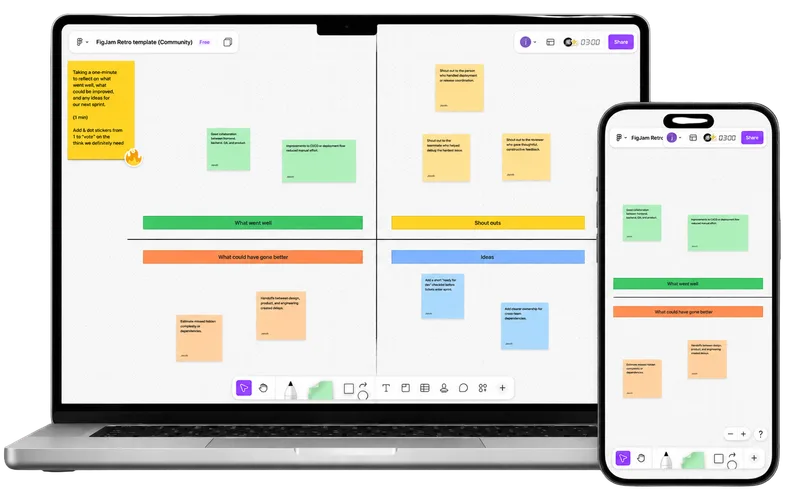
FigJam retrospective board shown on desktop and mobile

How FigJam describes itself

FigJam pitches itself as "The Online Collaborative Whiteboard for Teams" — bundled inside Figma for design and product teams who already collaborate there.

"Define ideas, align on decisions, and move work forward—all in one place."

The free Starter plan gives a team 3 FigJam files, 300+ templates, the timer, music and 150 AI credits a day — but voting sessions, audio chat and no-account guest links all need a paid team. Unlimited boards start at a $3/user/mo Collab seat (annual; $5 monthly) granting full FigJam editing with view-only Figma Design, so facilitators skip the $16 Full seat. Organization and Enterprise layer on SAML, SCIM, activity logs and EU data hosting. The buyer narrative: "Figma is already your platform — why pay for a second whiteboard?"

Our take

FigJam is the most fun retro venue in this list. Stamps, emotes, high-fives, music and cursor chat carry engagement on their own, and the AI sort-and-summarise genuinely works — it clusters stickies by theme and drafts an action-item summary in one click. At $3/user/mo for a Collab seat, unlimited boards are cheap to stand up.

The gaps are the ones a whiteboard always has: no tracked action items, no recurring retros, no health checks, no cross-team reporting. The AI writes action items as a text block — no owners, no due dates, no carryover. Every official connector — Jira, Confluence, Asana, Linear, Notion, Trello — embeds a Figma file in the other tool rather than pushing action items out of it; the one widget that files GitHub issues from stickies is community-built. Anonymity is thin: votes hide during a session then reveal who voted, and stickies always carry a name. The free tier is tighter than it looks too — 3 files, no voting, no audio.

Best if Figma is already home. If it isn't, a dedicated retro tool buys you owners, due dates and carryover for similar money.

Score breakdown

Ease of Use7.0
Retro Toolkit4.5
Value8.0
Fun Factor9.0
AI & Insights5.0
Integrations6.0
Open Platform8.5
Enterprise-grade9.5

Pros

  • + Cheap $3/user/mo Collab seat unlocks unlimited boards without a full Figma editor seat
  • + Free Starter tier includes real AI credits (150/day, 500/month), 300+ templates, the timer and music
  • + Same login and platform as Figma — zero friction for design-led teams
  • + Playful, engaging UX — stamps, emotes, high-fives, music, cursor chat — lifts retro fun factor
  • + Strong enterprise posture inherited from Figma: SAML, SCIM, activity logs, SOC 2 Type II, ISO 27001, EU data hosting on Enterprise

Cons

  • No native action-item tracking, recurring retros or health checks
  • Anonymity is weak — votes reveal who voted once the session ends, and stickies always carry a name
  • Official connectors embed Figma files in Jira/Confluence/Linear/Notion rather than pushing action items out; GitHub-issue creation is a community widget; no Azure DevOps
  • Free Starter caps a team at 3 FigJam files and excludes voting sessions, audio chat and no-account guest links
  • Built primarily for designers — the canvas paradigm is fiddly for structured retros, and large boards get sluggish

Features

Retrospectives

Templates· 300+ ready-made templates, incl. community retro boardsCustom templatesPrivate/public retros· Private files on paid teams

Facilitation

Meeting timerPresentation modeScreen-share mode@mentionsDrag-and-drop groupingAsync modeWhiteboard

Voting

Independent dot voting· Voting sessions on paid teams only (Professional and up)Custom vote count· Votes-per-participant configurable; paid teams only

Engagement

Mobile friendly· iOS app; full editing best on desktopPollingIcebreakersGIFsMusicCustom backgroundsPlanning poker· Via community widgetsTeam kudos· Stamps, emotes and high-fives; no persisted kudos record

AI

AI grouping / clusteringAI template suggestionsAI action items· AI summarises selected stickies into an action-item text block; no tracked action recordsAI summary

Reporting

Facilitator meeting notesExport formats· PDF, Image, CSV

Enterprise

SSO / SAML· SAML SSO on Organization and EnterpriseSCIM provisioning· SCIM on Organization and Enterprise; full seat management on EnterpriseSOC 2 Type 2GDPR compliantAudit logs· Activity logs on Organization and Enterprise; Activity Logs API on EnterpriseGuest / observer roles· Open sessions — 24h no-account guest editing; paid plans onlyMeeting history· Files persist; 30-day version history on Starter, unlimited on paidEmail domain restrictions· Domain capture on Organization and Enterprise; external-content restrictions on EnterpriseUptime SLA / dedicated support· Enterprise tierMulti-year contractsISO 27001 certifiedPublic APIWebhooksMCP server· Beta — official Figma MCP server, free during beta; retrieves FigJam resourcesData residency· United States, European Union (EU hosting (Frankfurt primary, Dublin backup) on Enterprise only; user metadata and login data stay outside the EU)

Integrations

Jira· Live Figma/FigJam embeds on Jira boards; no action-item pushLinear· Official embed of Figma/FigJam files in Linear issues; no action-item pushGitHub· Via community widget (create GitHub issues from FigJam)Trello· Official live embeds on Trello boards; no action-item pushAsana· Live Figma/FigJam embeds in Asana projects; no action-item pushMonday.com· Make connector + community widgetSlack· Native app — FigJam file/comment notifications + Slackbot-generated FigJam diagramsMicrosoft Teams· Native Figma-to-Teams connector (embed files in meetings/chats)Confluence· Live Figma/FigJam embeds in Confluence pages; no action-item pushNotion· Official embed of Figma/FigJam files in Notion; no action-item push

Compare FigJam against